
We have packed this release with meaningful improvements to the way your team sees, manages, and acts on safety data across dynamic environments. From smarter visibility controls to more intuitive navigation, every update in this release is designed to improve the speed and confidence with which you can make decisions, whether you are overseeing a single site or coordinating safety across a network of locations.
The March 2026 update focuses on reducing the distance between your data and the actions it should drive. The Insights Platform now surfaces the most relevant information faster, connects events directly to their locations on your site map, and provides built-in context so that every chart you view is immediately actionable. These changes are designed to help your team spend less time navigating the platform and more time acting on the insights it delivers.
This release also introduces a series of refinements to onboarding, chart navigation, and site map detail that make the platform easier to use at every level of your organization. The updates described below reflect feedback from safety managers, operations teams, and site administrators working across a wide range of industries and deployment types.
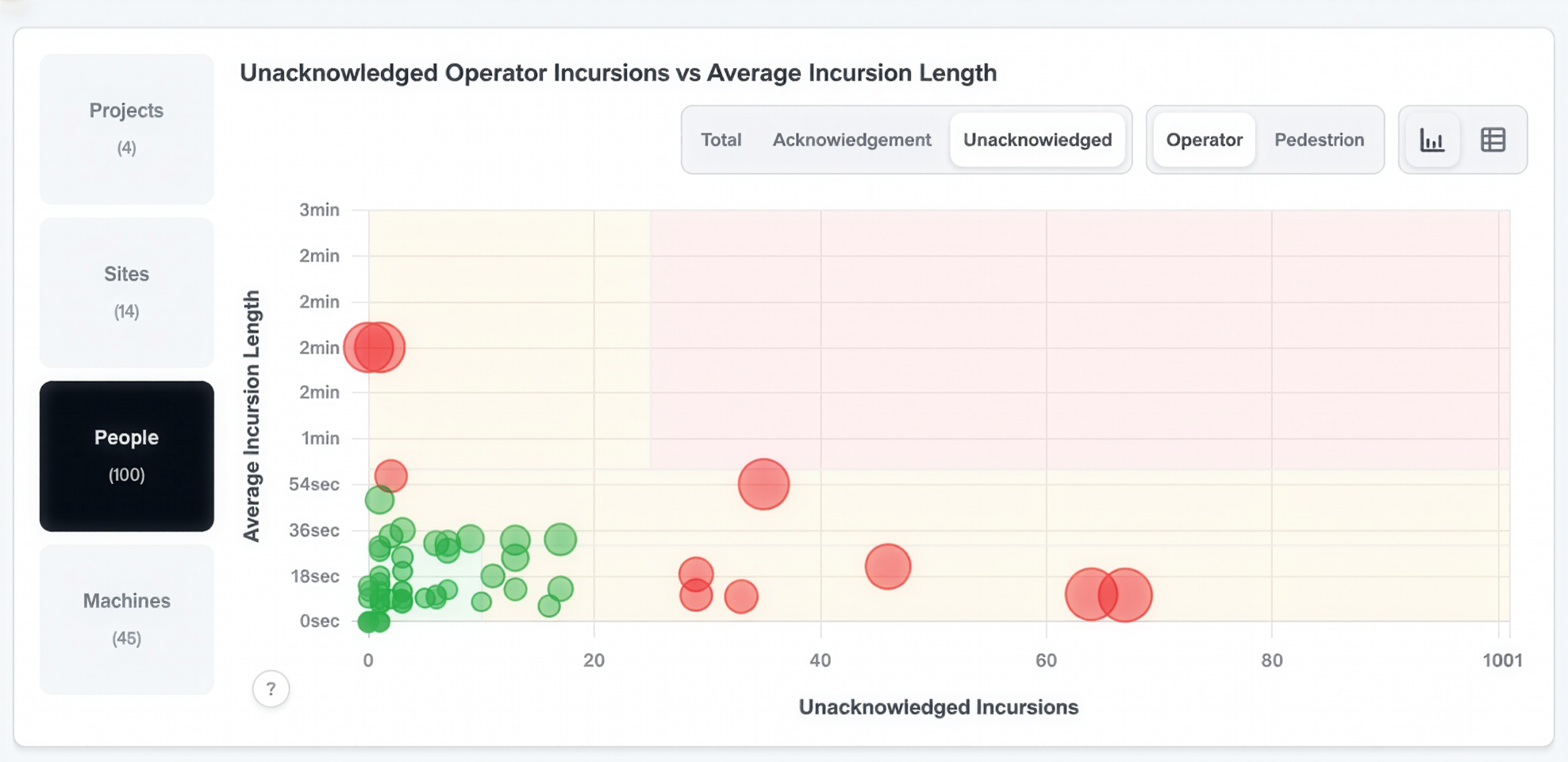
The Insights Platform Overview page now opens directly to the scatter graph view for people and machines, giving you an immediate visual picture of activity across your sites the moment you arrive. Previously, reaching this view required additional steps after loading the page. Now, the scatter graph is the default, allowing you to spot patterns, identify concentrations of movement, and surface actionable insights without any extra navigation.
The scatter graph presents a high-level view of both pedestrian worker and machine activity, enabling you to quickly assess where interactions are occurring and whether any areas of your site warrant closer attention. The table view remains fully accessible whenever you need it, allowing you to move seamlessly between visual and detailed data depending on what your analysis requires. This flexibility means you can use the overview as a starting point for deeper investigation or as a quick daily check on site activity, without the platform dictating how you work.
The Insights Platform now links your event log and site map together, so you can select any incursion and instantly see where it happened without switching views or losing your position in the data. This connection is designed to reduce the time it takes to move from identifying an event to understanding its context, enabling faster and more confident responses to the activity your detection zones are capturing.
The integration works across both the Pedestrian Overview and Operator Overview tabs, and the connection flows in both directions. You can start from the event log and jump directly to the corresponding location on the site map, or you can begin with the map and navigate to the associated event detail. Whichever direction you choose, the platform keeps your place and delivers the full picture without requiring you to manually cross-reference between separate views.
Building a clear understanding of activity across your detection zones now takes fewer steps. For safety managers reviewing patterns over time, or operations teams responding to specific incidents, this update is designed to improve the speed and accuracy of every investigation you conduct within the platform.
Site maps in the Insights Platform now surface a greater level of detail, giving you a clearer and more complete picture of activity across your locations. The additional context available directly within the map view is designed to help you make faster, more confident decisions without needing to leave the map to find supporting information.
These improvements are particularly valuable when reviewing detection zone coverage or assessing the distribution of incursion events across a site. You can now use the map as a primary analytical tool rather than a secondary reference, allowing your team to build a more intuitive understanding of how activity is distributed and where attention may be needed most.
Chart navigation across the Insights Platform has been refined with repositioned tabs that make moving between views more intuitive. The updated layout is designed to reduce the cognitive load of finding the right chart or data set, so your team can focus on interpreting the information rather than locating it.
The repositioned tabs apply consistently across every view in the platform, meaning the navigation experience is predictable regardless of where you are working. For teams that use multiple views as part of their regular workflow, this consistency is designed to improve the speed and ease of moving through the platform during both routine reviews and time-sensitive investigations.
Every chart in the Insights Platform now includes built-in contextual information, helping you understand what you are looking at and what action it might support without needing to consult external documentation or ask a colleague. This context is embedded directly within the chart interface, making it available at the moment it is most useful.
This update is designed to make the platform more accessible to a wider range of users across your organization, including those who may be newer to working with safety data or who use the platform less frequently. By providing clear, in-context explanations alongside the data itself, the platform now helps every user act on the insights it delivers with greater confidence and accuracy.
Onboarding in the Insights Platform now resumes automatically from where you left off if your setup process is interrupted. Previously, an interrupted onboarding session could result in lost progress, requiring administrators to repeat configuration steps they had already completed. Now, the platform saves your progress continuously, so you can return to setup at any point and pick up exactly where you stopped.
This update is designed to reduce the time and effort required to get new sites or users fully configured, particularly in environments where setup may need to happen in stages or across multiple sessions. No configuration progress is ever lost, allowing your team to move through onboarding at a pace that works for your operational schedule.

